
EmailGuard
  • Pricing
Log inRegister
DocumentationAPI ReferenceKnowledge Base

Documentation

Documentation

Help center guides

Getting started
  • Introduction
  • Getting started in the app
  • Sign-in and account recovery
Teams
  • Creating and switching teams
  • Team settings
  • Inviting and managing members
  • Accepting team invitations
  • Understanding roles
Account
  • Managing your account
  • Securing your account
Billing
  • Billing plans and subscription
  • Billing usage
Notifications
  • Notification rules
  • Notification channels
Security
  • Audit log
Developers
  • Creating API keys
  • Your first email detection check
  • Integrating from the dashboard

Billing usage

Read usage metrics and charts for the active team over a selected date range.

Loading article…

On this page

  • Choose a range
  • What you will see
  • Tips
  • Related articles

Open Team → Billing → Usage (/team/billing/usage) to open the Usage Dashboard and see how the active team consumed billable resources over time.

Requires billing:read on the active team.
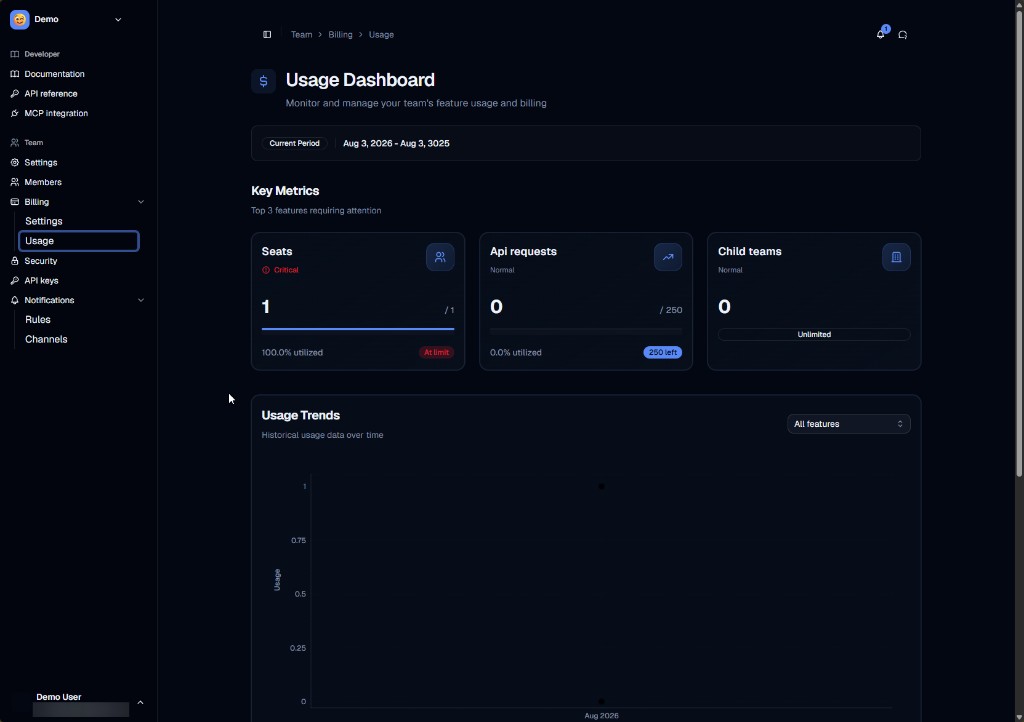
Usage Dashboard with seats, API requests, and trends chart

Choose a range

The header shows the current period (for example a billing window). Use the range controls to pick a preset period or a custom start/end. Metrics and charts refresh for that window.

What you will see

SectionPurpose
Key metricsTotals such as seats, API requests, and child teams, with status badges (for example remaining quota or at limit)
Usage trendsHistorical usage over time; filter by feature when needed
In-depth usageBreakdown rows for individual usage items (when shown below the chart)

Treat these views as operational visibility for the team — not a replacement for Stripe invoices. For plan changes and invoices, use Billing plans and subscription (Team → Billing → Settings).

Tips

  • Switch teams before comparing usage across workspaces.
  • API detect traffic may also be constrained by per-minute rate limits even when monthly quota remains.

Related articles

  • Billing plans and subscription
  • Your first email detection check